
PDF to PowerPoint
Convert PDF to PowerPoint online
or drop a PDF here
No file selected
Files stay private. Automatically deleted after 2 hours.
Step by step
How To Convert PDF to PowerPoint
Turn every page into a slide — straight from the browser, no account needed.
-
1
Upload your PDF
Drop in the document. Scanned uploads are flagged right away, exactly like the other converters — there is no text to place on slides.
-
2
Press Convert to Powerpoint
The screen is minimal — one button, nothing to configure. The text is placed on the slides as real slide text, ready to edit.

-
3
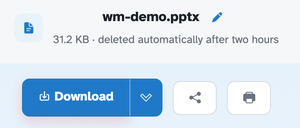
Download the deck
The ready page hands back a real .pptx — in our test the four-page document came back as a 31.2 KB deck with four slides, opening in PowerPoint, Keynote or Google Slides.
-
Slide per page
Each page becomes its own slide.
-
Editable slides
The text lands as real slide text — tweak it in PowerPoint, Keynote or Slides.
-
Page count kept
Four pages in our test came back as a four-slide deck.
-
Scans flagged
A scanned PDF has no text to place — the screen says so instead of guessing.
-
Opens anywhere
Standard .pptx — PowerPoint, Keynote, Google Slides, LibreOffice.
-
Private by default
No account, no watermark — and every file is automatically deleted after 2 hours.
Selected:
Converting scanned documents is not supported. Scanned PDFs are images of text and lack the actual text data needed for conversion.
File: