All tools

PDF to Word

Convert from PDF to DOC online

or drop a PDF here

No file selected

Files stay private. Automatically deleted after 2 hours.

Step by step

How To Convert PDF to Word

Turn a PDF into an editable Word document — the layout kept, or the text reflowed for easy reading.

  1. 1

    Upload your PDF

    Drop in the document. Scanned uploads are flagged right away — a scan is a picture of text, so there is nothing for the converter to read.

  2. 2

    Choose the conversion

    Keep layout keeps text and images where the page put them — it is the default. Optimize for legibility reflows the text for easy reading, Kindle-style. Clicking a card runs it straight away; Continue takes Keep layout.

    Choose an option: Keep layout beside Optimize for legibility — Easy reading on Kindle, etc. — above the Continue button
  3. 3

    Download the .docx

    The ready page hands back a real Word document — 36 KB for our four-page test — with the paragraphs as editable text, ready for Word, Pages, Google Docs or LibreOffice.
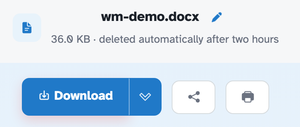
    The ready page showing wm-demo.docx — 36.0 KB · deleted automatically after two hours — above the Download button
  • Keep layout

    The default — text, images and spacing stay where the page put them.

  • Optimize for legibility

    Reflows the text for easy reading — Kindle and friends.

  • Real .docx

    Opens in Word, Pages, Google Docs and LibreOffice.

  • Editable text

    Paragraphs arrive as text you can type over, not pictures.

  • Scans flagged

    A scanned PDF has no text to convert — the screen says so instead of guessing.

  • Private by default

    No account, no watermark — and every file is automatically deleted after 2 hours.

PDF to Word — frequently asked questions

Will the Word document be editable?

Yes — text, headings and images land in a .docx you can edit straight away. Pick Keep layout for fidelity, or plain text when you mainly want the words.

Why did my scanned PDF convert with no text?

Scanned pages are pictures — there is no text to bring across. Run OCR first: it adds a real text layer (recognition happens in your browser), and the same conversion then returns editable paragraphs.

Should tables go to Word or Excel?

Excel — Word stores tables as layout, not data. Send the PDF to PDF to Excel when the numbers need calculating, charting or importing.

Is PDF to Word free?

Yes — PDF to Word is free right here in your browser, with no watermark and no sign-up. Every tool on the site works the same way.

Do I need an account to use PDF to Word?

No. Accounts are optional — they keep your credits, API keys and settings together. The tools work signed-out.

What happens to my file?

Every upload is stored under an unguessable id and deleted automatically after 2 hours. Nothing is listed, shared or emailed anywhere.

Can I run PDF to Word from the API?

Yes — every tool has a REST endpoint. An API call for this tool costs 10 credits per file; browser use stays free. See the Plans & pricing page for plans and the API page for the endpoint list.

More answers on the Help page. Building with the API? Plans & pricing.