
Rename
Change document filename based on text from the PDF pages
Sets the document title from the text on its first page.
or drop a PDF here
No file selected
Files stay private. Automatically deleted after 2 hours.
Step by step
How To Rename a PDF
Name a PDF after what is inside it — select text on the page, write a pattern, done.
-
1
Upload your PDF
The pages open right in the browser — a note explains the trick: select with your mouse an area of the page, as many areas as the name needs. Files are deleted after 2 hours.
-
2
Write the pattern
[TEXT1], [TEXT2]… pick up the text you selected on the page; [BASENAME] is the file's own name and [DATE] is today — mix them with your own words. Our test typed [BASENAME]-final into the Rename pattern box.
![The Rename pattern box holding [BASENAME]-final above the blue Rename PDF button](/static/img/rn-guide/bar.png)
-
3
Rename & download
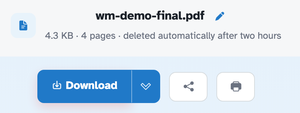
Press Rename PDF and the file downloads under its new name — wm-demo.pdf left our run as wm-demo-final.pdf, page for page, 4.3 KB · 4 pages.
-
Rename from the page
[TEXT1], [TEXT2]… take whatever text you select on the page.
-
Placeholders carry the rest
[BASENAME] the file's own name, [DATE] today — plus your own words.
-
One box, one rule
The pattern box drives the name — our run typed [BASENAME]-final.
-
Content untouched
Pages, text and images stay exactly as they were.
-
Name kept on download
wm-demo.pdf left the site as wm-demo-final.pdf.
-
Private by default
No account, no watermark — and every file is automatically deleted after 2 hours.
Selected: